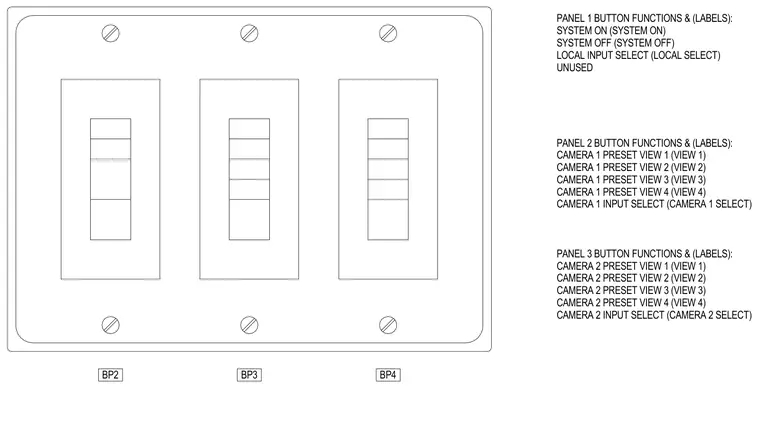
Three multi-gang control panels outline the button functions and corresponding labels for system power, local input selection, and camera preset views. Panel one includes buttons for system on, system off, local input select, and one unused position. Panel two contains camera one preset views one through four and camera one input select. Panel three provides camera two preset views one through four and camera two input select.
BP2 BP3 PANEL 1 BUTTON FUNCTIONS & (LABELS): SYSTEM ON (SYSTEM ON) SYSTEM OFF (SYSTEM OFF) LOCAL INPUT SELECT (LOCAL SELECT) UNUSED PANEL 2 BUTTON FUNCTIONS & (LABELS): CAMERA 1 PRESET VIEW 1 (VIEW 1) CAMERA 1 PRESET VIEW 2 (VIEW 2) CAMERA 1 PRESET VIEW 3 (VIEW 3) CAMERA 1 PRESET VIEW 4 (VIEW 4) CAMERA 1 INPUT SELECT (CAMERA 1 SELECT) PANEL 3 BUTTON FUNCTIONS & (LABELS): CAMERA 2 PRESET VIEW 1 (VIEW 1) CAMERA 2 PRESET VIEW 2 (VIEW 2) CAMERA 2 PRESET VIEW 3 (VIEW 3) CAMERA 2 PRESET VIEW 4 (VIEW 4) CAMERA 2 INPUT SELECT (CAMERA 2 SELECT) BP4
Members view this detail in full resolution, download the CAD files (SVG, PDF), and can adapt it in the built-in CAD editor — export DXF, DWG, or PDF.
Start membership